
What Does KOT Stand For? KOT vs KDS Explained for Restaurants
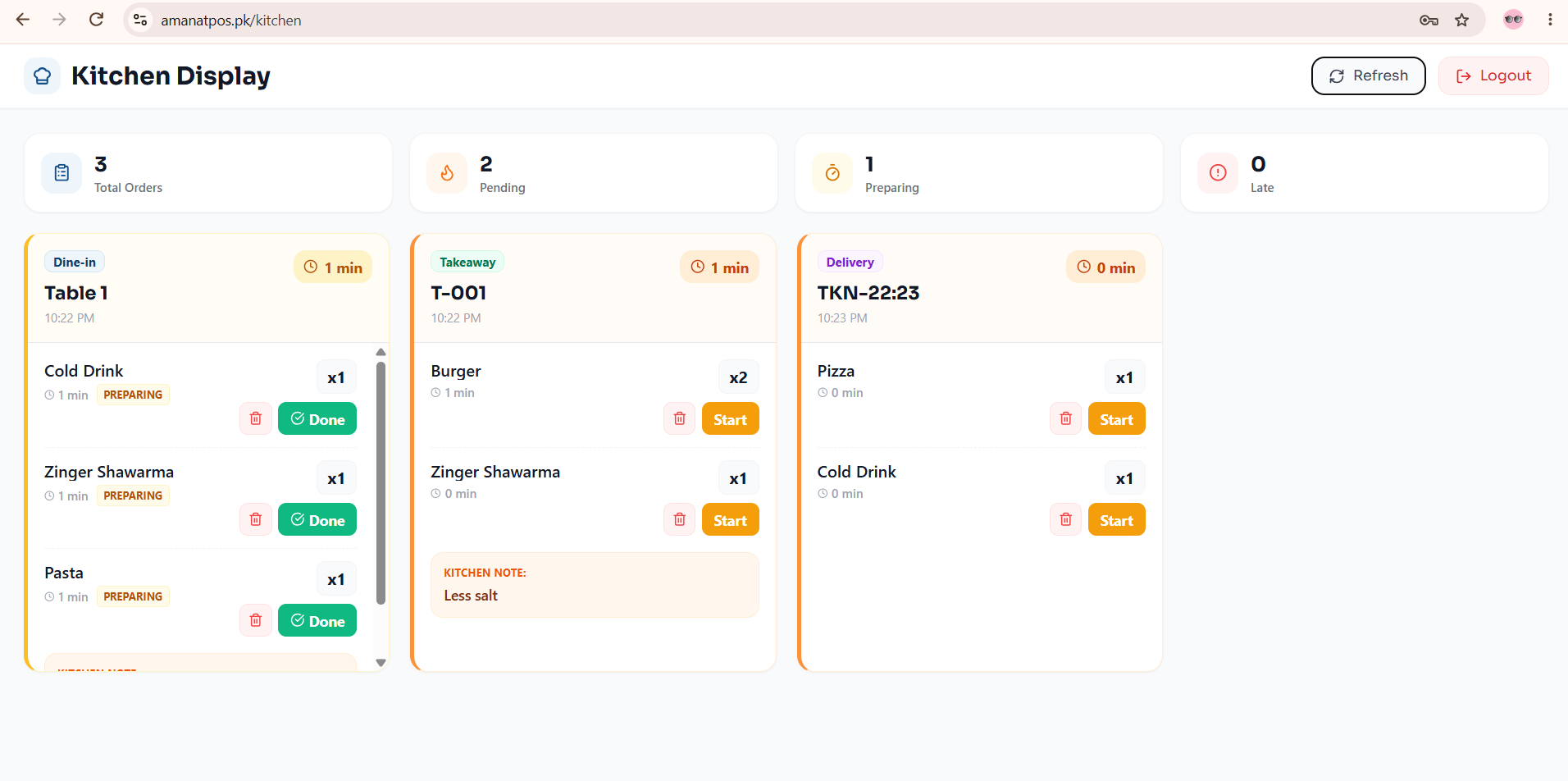
KOT stands for Kitchen Order Ticket. KDS stands for Kitchen Display System. A KOT is the order message sent to the kitchen, and a KDS is the screen where the kitchen sees and manages it.
In a restaurant, the kitchen is where a customer's wait either becomes a good experience or a bad one. If an order reaches the kitchen late, incomplete or unclear, everything after that goes wrong: cold food, wrong dishes, angry guests.
That is why every restaurant POS talks about two terms: KOT and KDS. They sound similar, and many owners use them as if they mean the same thing. They do not. This guide explains the difference in simple words and helps you decide what your restaurant needs.
What is a KOT?
KOT stands for Kitchen Order Ticket. It is the message that carries an order from the counter or the table to the kitchen.
When a waiter or cashier takes an order, the POS creates a KOT. It lists what was ordered, how many, which table or order type it belongs to, and any special notes such as "no onions" or "extra spicy."
Traditionally, a KOT is a slip of paper. In a modern POS, the KOT is a digital record that the system creates for every order, so nothing depends on handwriting or memory.
In one line: KOT is the order message.
What is a KDS?
KDS stands for Kitchen Display System. It is a screen in the kitchen that shows incoming orders.
Instead of a stack of paper slips, the kitchen team sees a live list of orders on a screen. They can see what is new, what is being prepared and what is ready, and they can update the status as they work.
In one line: KDS is the screen where the kitchen sees and manages those orders.
KOT vs KDS: the main differences
| KOT | KDS | |
|---|---|---|
| What it is | The order message sent to the kitchen | A screen that displays orders in the kitchen |
| Format | Often paper, can also be digital | Always digital |
| Order status | Usually tracked by hand or by calling out | Updated on screen (new, preparing, ready) |
| Risk of loss | Slips can be lost, damaged or misread | Orders stay visible until completed |
| Setup | Needs a way to receive or print the order | Needs a screen in the kitchen |
| Best for | Small or simple kitchens | Busy kitchens and growing restaurants |
The important point is that they are not competitors. A KDS shows the KOT on a screen. Many restaurants use a KOT and a KDS together, as part of the same flow.
Pros and cons of a paper KOT
Pros
- Very simple. Everyone understands it.
- No extra screen needed in the kitchen.
- Works when a screen is not an option.
Cons
- Paper can be lost, wet or hard to read.
- Changes to an order are easy to miss.
- No clear view of what is still waiting or running late.
- The cashier cannot easily see if an order is ready.
Pros and cons of a KDS
Pros
- Orders are clear, in order and always visible.
- Changes and notes appear on screen instead of on a slip that can be missed.
- Order status can be updated when food is ready.
- Less paper, and less shouting across the kitchen.
Cons
- Needs a screen and a place to put it safely in the kitchen.
- Kitchen staff need a little time to get used to it.
- Needs a stable setup, so check how your POS works if your internet is unreliable.
Which one does your restaurant need?
A simple KOT may be enough if:
- You run a small cafe or a small counter with a few orders at a time.
- Your kitchen is small, and everyone can see and talk to each other.
- You are just starting out and want the simplest setup first.
A KDS is worth considering if:
- Orders come from many places (dine-in, takeaway and delivery) at once.
- Your kitchen is busy, and orders are sometimes missed or delayed.
- You have more than one cooking station.
- You want to know how long orders take.
- You want to reduce paper and mistakes.
If you are unsure, start with the way your kitchen works today. Where do orders go wrong? If the answer is "we lose slips" or "we do not know which order is next", a KDS will probably help.
Questions to ask before choosing a POS
- Does it support both KOT and KDS, or only one?
- Can the kitchen mark an order as ready, and does the counter see it?
- Do special notes ("no onions", "extra spicy") reach the kitchen clearly?
- Can I give kitchen staff their own login with limited access?
- Does it handle dine-in, takeaway and delivery orders in the same flow?
We covered more of these in our restaurant POS buyer's checklist.
How Amanat POS handles kitchen orders
The Restaurant Edition of Amanat POS includes KOT and a Kitchen Display System, along with table management, dine-in and takeaway orders, order status tracking and rider dispatch. Kitchen staff can have their own role in the system, so they see what they need without access to the rest of the business.
Pricing for the Restaurant Edition is Rs. 5,999 per month per location, with the first month free and no credit card required. You can read more on the Restaurant Edition page or see all editions on the pricing page.
If you are comparing options and wondering about costs, our guide on what is really free in POS software can help.
The best test is to try it with your own menu and your own kitchen team. You can book a demo or start your free first month.
Quick summary
- KOT is the order message sent to the kitchen.
- KDS is the screen where the kitchen sees and manages those orders.
- They work together. A KDS shows KOTs digitally.
- Small kitchens can start with a simple KOT. Busy kitchens benefit from a KDS.
- Choose a POS that supports both, so you can grow without changing systems.
Frequently asked questions
What does KOT stand for in a restaurant? KOT stands for Kitchen Order Ticket. It is the order message sent from the counter or table to the kitchen.
What does KDS stand for? KDS stands for Kitchen Display System. It is a screen in the kitchen that shows incoming orders.
Is KDS better than KOT? Not always. A KDS is more useful for busy kitchens. A simple KOT can be enough for a small cafe. The best choice depends on how many orders you handle and where mistakes happen.
Can I use KOT and KDS together? Yes. Many restaurants use both. The KOT is the order itself, and the KDS is the screen that shows it in the kitchen.
Does Amanat POS support KOT and KDS? Yes. The Restaurant Edition includes KOT and a Kitchen Display System, along with table management and order status tracking.
Ready to streamline your business?
See how Amanat POS can help you manage billing, inventory, and operations — all in one system.
Related Articles
Free POS Software in Pakistan: What Is Really Free and What Is Not?
Searching for free POS software in Pakistan? Learn the difference between a free plan, a free trial and a free-looking product with hidden costs, before you commit.
How to Choose a Restaurant POS System in Pakistan: A 2026 Buyer's Checklist
A restaurant is not a shop. Here is a simple checklist to help you choose a POS system that fits table service, kitchen workflow, delivery and FBR requirements.
How to Manage Customer Udhaar (Credit) in Your Shop Without a Notebook
Udhaar keeps customers loyal, but notebook records cause disputes and lost money. Learn simple rules to manage customer credit, and how a POS makes it easier.